The DLEs.io Discord Bot

Post your daily game shares in Discord like you already do. The bot logs them automatically, tracks your group's winners, and posts a daily podium in your channel.

  • Auto-logs shares with a ✅ reaction in chosen channels
  • Daily group podium image posted on your schedule
  • Use /dles in any server or DM with a personal install
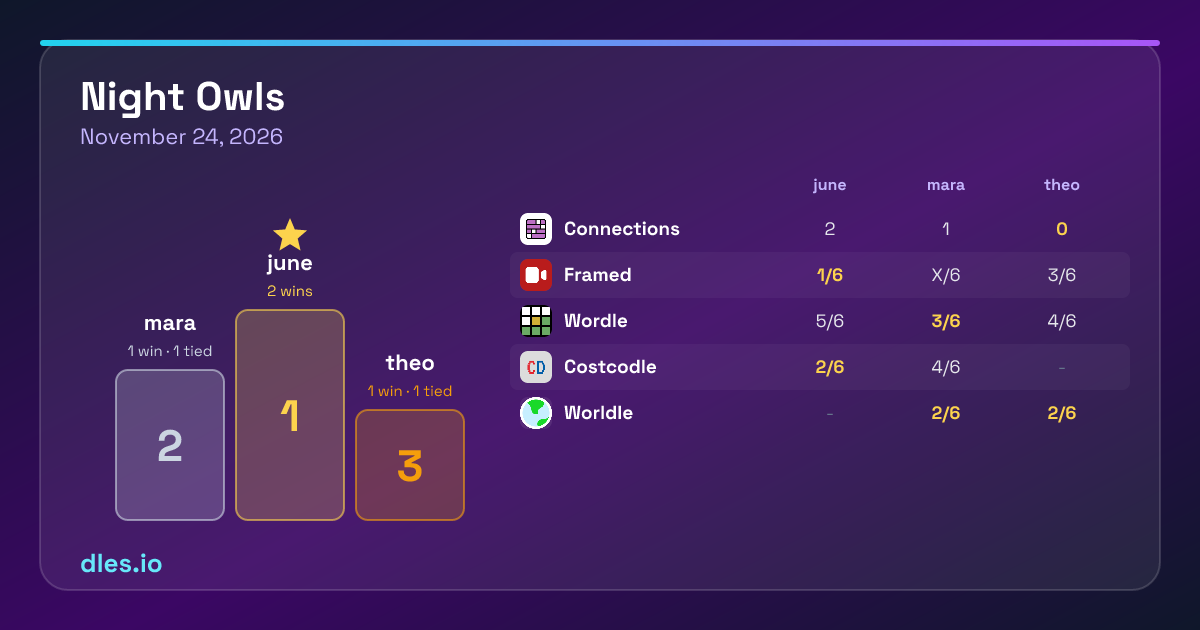
mara 8:02 AM
Wordle 1,612 3/6
1
theo 8:04 AM
Connections #891
1
DLEs.io App 8:05 AM

Night Owls · Yesterday

Daily group podium posted by the DLEs.io Discord bot

Add To A Server

  1. 1

    Invite The Bot

    Pick the server you want to add it to. You need Manage Server permissions there.

  2. 2

    Run /dles listen In A Channel

    An interactive setup card opens right in Discord. Link an existing group, create a new one on the spot, or log linked players without a group. Choose how to handle players without accounts and when yesterday's podium posts.

  3. 3

    Post Shares Like Normal

    Recognized shares get a ✅ reaction when saved. Change channels, timing, or groups anytime with /dles listen or in My Discord Servers.

Add To My Discord

  1. 1

    Link And Install

    Links your DLEs.io account and adds the /dles command to your Discord profile in one step. No server permissions needed.

  2. 2

    Use /dles Anywhere

    Log a share, print your day, or check your average for any game in any server, DM, or group chat — even where the bot isn't installed.

Commands

Everyday Commands
/dles log <share>
Log a pasted game share
/dles today
Today's group board here, or your own results
/dles yesterday
Yesterday's group board here, or your own results
/dles day <date>
Your results on a date (2026-10-31, 10/31, yesterday)
/dles average <game>
Your average, best score, and streak for a game
/dles link
Link your Discord to a DLEs.io account
/dles invite
Post this channel's group invite link
/dles forget
Delete scores kept for you without an account
Server Channel Setup
/dles listen
Open the setup card to log shares, link groups, or edit settings
/dles stop
Stop logging shares in this channel
/dles connect <group>
Bind this channel directly to a group you admin

FAQ

Do Players In My Server Need A DLEs.io Account?
No. When you set up a channel with a group, choose whether unlinked players are added automatically when they share, asked once via DM (or in the channel if DMs are closed), or ignored. Anyone tracked without an account can run /dles link later to keep their history, or /dles forget to delete it.
What Messages Does The Bot Read?
Only channels where a server manager enabled /dles listen, and only messages that match a known game's share format. Normal conversation is ignored, and a game day you already logged is skipped.
What Is The Difference Between Adding To A Server And Adding To My Discord?
Adding to a server lets the bot listen in chosen channels, react with ✅ on saved shares, and post daily group results automatically. Adding to your Discord account puts /dles slash commands on your profile so you can log shares and check stats in any server or DM.
Can One Group Post To Multiple Channels, Or Multiple Groups Share A Channel?
Yes. Channels and groups are many-to-many. Add or remove groups anytime with /dles listen in Discord or from My Discord Servers.
Why Didn't The Bot React With ✅ To My Share?
Check three things: logging is turned on for that channel (/dles listen), your account has Log My Shares Posted In Discord enabled in Settings (if you're linked), and the bot has View Channel, Read Message History, Add Reactions, Send Messages, Embed Links, and Attach Files permissions in that channel.
How Do I Stop Logging Or Unlink My Account?
Server managers can run /dles stop in a channel or remove it in My Discord Servers. Linked players can pause auto-logging or unlink Discord in Settings, and unlinked players can run /dles forget.